All guide pages
Welcome to DesignerXStudio launcher & favouritesSaving & My DesignsTemplatesExporting & printingShortcuts & everyday toolsDesignChiselLithophaneKeychainClickerMesh BoxBeadsMore tools & pagesTroubleshooting & FAQA keychain whose outline follows your artwork, with a key-ring tab, ring or hole, and optionally an NFC pocket.
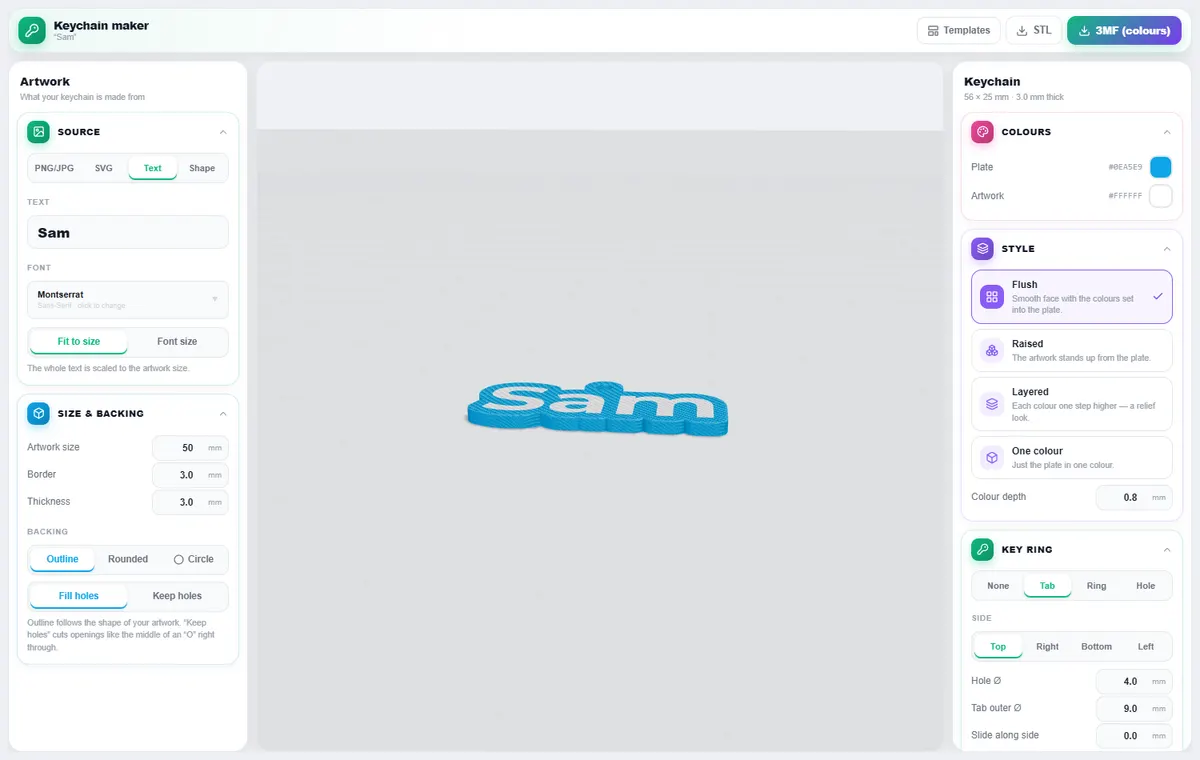
How to use it
- Choose a source: PNG/JPG, SVG, Text or a built-in Shape.
- For text, pick a font (or upload one) and Fit to size or an exact Font size.
- Set the artwork size, border and thickness, and choose the backing: Outline, Rounded or Circle. Fill holes closes the middle of letters; Keep holes cuts them out.
- Choose a style: Flush (colours set into the plate), Raised, Layered or One colour, and set the colours.
- Add the key ring: a Tab, Ring or plain Hole, on any side, with adjustable size and position.
- Export a 3MF (colours) or STL.
What you can do
Picture clean-up
PNG/JPG backgrounds can be removed automatically, and you can use the dark parts only or the whole shape.
NFC pocket
A recess for an NFC sticker, with a pause height so you can drop the tag in mid-print and seal it.
Styles
Flush inlay prints a smooth face; layered gives a stepped relief look.
Tips
Bold fonts and shapes with thick strokes give the strongest keychains.
Keep the tab hole at least 4 mm so a ring fits.
Looking for the overview? See Free Custom 3D Printed Keychain Designer.
Try it yourself
DesignerX is free to use in your browser. Create a free account to save your designs.